


The Importance of Tactile Feedback
Imagine a world without the satisfying click of a keyboard or the reassuring “beep” when you press a button on your smartphone. It’s a world that lacks the sensory connection we often take for granted but can’t live without. Now, enter the realm of membrane switches, where tactile feedback reigns supreme.
It’s easy to overlook tactile feedback as the unsung hero of user interaction because touchscreens and virtual interfaces have become such a norm. However, its importance cannot be understated.
In this blog, we’ll explore the vital role that tactile feedback plays in membrane switches. We’ll also explore why it’s a necessity in today’s ever-evolving landscape of user interface design. Strap in, because you’re about to discover the tangible difference that tactile feedback makes in the world of technology.
What Is Haptic Technology?
Haptic technology, often referred to simply as “haptics,” enables users to sense and interact with virtual environments or digital devices through touch. It’s a technology that leverages tactile feedback mechanisms, such as vibrations, force, or motion, to replicate the sense of touch and enhance the overall user experience.
Whether it’s the subtle vibration of a smartphone when you receive a notification, the resistance you feel when using a gaming controller, or the precise feedback provided by a surgical simulator during medical training, haptic technology brings a new dimension to our interactions with technology.
It not only adds realism and immersion to virtual experiences, but also has a wide range of applications in industries such as manufacturing, aerospace, gaming, healthcare, automotive, and more, fundamentally changing the way we engage with the digital world.
How Membrane Switches Utilize Tactile Feedback with Haptics
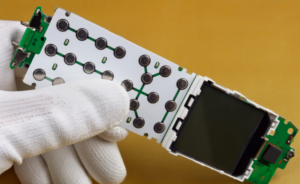
Membrane switches consist of multiple layers, typically including a top graphic overlay with printed symbols or labels, a middle spacer layer, and a bottom circuit layer. These layers work together to register user inputs when pressure is applied to the surface.

Membrane switches incorporate haptic technology by integrating feedback mechanisms to provide tactile sensations, enhancing user interactions with a satisfying click or vibration upon pressing the switch. There are two types of membrane switches: tactile and non-tactile.
Tactile Membrane Switches
Tactile membrane switches are designed to provide users with a physical response upon pressing a button. Beneath the top layer, they incorporate a dome or bubble-shaped tactile switch, which, when compressed, offers a distinct and perceptible “click” or “snap” sensation.
Tactile membrane switches find applications in devices like computer keyboards, remote controls, and appliances, where users rely on the tactile sensation to navigate and input commands with confidence.
Non-Tactile Membrane Switches
Non-tactile membrane switches, on the other hand, lack the pronounced physical feedback of their tactile counterparts. Instead, they typically use a flat, domeless design beneath the graphic overlay, making them quieter and less responsive to touch.
These switches are commonly used in devices where a quieter operation is preferred, such as mobile phones, touch-sensitive control panels, and medical equipment, where the absence of a pronounced click is desirable for user comfort or noise reduction.
Types of Tactile Feedback
Now that we’ve explored the role of haptic technology in membrane switches, let’s dive deeper into the realm of tactile feedback—the cornerstone of a more engaging and intuitive user interface.
Tactile feedback, also known as haptic feedback, is the art of conveying the sensation of touch through various mechanical means. In the context of membrane switches, this technology ensures that users receive a satisfying and responsive experience with every press.
Here are the five primary types of tactile feedback:
- Vibrotactile Feedback
- Force Feedback
- Electro-Tactile Feedback
- Thermal Feedback
- Ultrasound Feedback
Vibrotactile Feedback
This form of haptic feedback relies on small vibrating actuators integrated into the membrane switch. When a user presses a button, these actuators generate controlled vibrations. It delivers a subtle but noticeable sensation to the user’s fingertips.
Vibrotactile feedback is commonly found in smartphones and gaming controllers, enhancing the tactile experience during interactions.
Force Feedback
Force feedback haptics offer a more substantial resistance or pressure sensation when a membrane switch is actuated. These switches are equipped with actuators capable of applying resistance to the user’s touch, mimicking the feeling of pressing a physical button.
This type of feedback is prevalent in advanced automotive touchscreens. It ensure that users can operate the controls without taking their eyes off the road.
Electro-Tactile Feedback
Electro-tactile feedback relies on low-voltage electrical signals to stimulate the skin’s surface, creating a tactile sensation. Although less common than other forms, it finds applications in medical devices, rehabilitation equipment, and virtual reality systems, where precise and controlled feedback is crucial for user safety and immersion.
Thermal Feedback
Thermal haptic feedback uses variations in temperature to simulate touch sensations. When a user interacts with a membrane switch equipped with thermal feedback, they may experience a subtle warming or cooling sensation, enhancing realism in virtual environments or medical simulators.
Ultrasound Feedback
Ultrasound-based haptic technology utilizes high-frequency sound waves to create localized pressure points on the skin.
By modulating the ultrasound signals, this feedback mechanism can generate varying levels of pressure and texture sensations, making it suitable for tasks like fine manipulation in surgical training or architectural modeling.
Benefits of Tactile Feedback
Tactile feedback is not just a luxury, it’s a necessity for many industries. Whether it’s used to increase user confidence, improve usability, or enhance overall user satisfaction, tactile feedback is an indispensable element in modern interface design.
Let’s go over some of the main benefits of implementing tactile feedback into your membrane switches.
Increased Accuracy
One of the standout advantages of incorporating tactile feedback into membrane switches is the significant boost in accuracy it brings to user interactions. When users press a button and receive tactile confirmation through sensations like a satisfying click, subtle vibration, or resistance, they can be more confident that their input has been registered correctly.
This increased accuracy is especially critical in industries where precision is paramount. This includes medical devices, aerospace controls, or industrial automation. With tactile feedback, users can navigate complex interfaces and execute critical commands with unwavering assurance.
Improved User Experience (UX)
At the heart of any exceptional user experience lies the synergy between technology and human senses. Tactile feedback plays a pivotal role in elevating the overall UX of membrane switches. It makes interactions more intuitive and responsive. Users are drawn to interfaces that provide tactile cues, as these cues create a sense of familiarity and engagement.

Whether it’s the tactile sensation of pressing a button on a phone or the reassuring click of a keyboard, tactile feedback enhances usability and fosters a more enjoyable and efficient interaction with digital devices.
User Satisfaction
Ultimately, the goal of any user interface design is to satisfy the end user. Tactile feedback in membrane switches goes a long way in achieving this objective. When users experience the physical response of a button press, they feel more in control and develop a sense of trust in the device.
This trust translates into higher user satisfaction levels, which can have a profound impact on product loyalty and brand reputation. Membrane switches that provide tactile feedback are more likely to garner positive reviews, fostering a loyal user base that values both functionality and tactile comfort.
As the demand for intuitive and responsive interfaces continues to grow, tactile feedback remains a critical element in meeting these expectations and redefining the future of user interaction.
Talk to an Expert About Tactile and Non-Tactile Switches
As you can see, tactile feedback isn’t merely a superficial feature—it’s a fundamental component that enriches the membrane switch experience in profound ways.
From enhancing accuracy to elevating the overall UX and ensuring user satisfaction, the integration of tactile feedback into membrane switches represents a technological stride forward that benefits both users and industries alike.
Don’t know which membrane switch is right for you? The experts at Hallmark Nameplate are here to help. With over 60 years of experience, we know the importance of choosing the right membrane switch for your application. Talk to one of our experts and get a FREE quote today!
Want to learn more? Read our complete guide, Everything You Need to Know About Membrane Switches.
Related Resources from Hallmark Nameplate
- Hallmark Nameplate products and services
- Increasing overall equipment effectiveness (OEE)
- How to choose a nameplate manufacturer
- How to choose a manufacturer
Frequently Asked Questions About the Benefits of Tactile Feedback
Why is tactile feedback important in industrial equipment?
Because it confirms input without requiring the operator to look. On a plant floor the operator is usually watching the process, not the panel, and often cannot hear a beep over ambient noise. A felt click confirms the command registered, which reduces double-presses, missed inputs and the pause operators otherwise take to verify on screen. The result shows up as fewer setup errors and faster response to alarms.
When should you specify tactile instead of non-tactile switches?
Specify tactile when the operator wears gloves, when the environment is noisy, when the panel is operated without looking directly at it, or when a mis-press has real consequences. Specify non-tactile when the priority is a flush modern surface, when actuation counts are extremely high and dome life becomes the limiting factor, when the panel must be fully sealed with no embossing, or when cost per unit at volume is the dominant constraint.
Does tactile feedback reduce operator error?
It addresses one specific class of error: uncertainty about whether an input registered. That uncertainty causes repeated presses, which on some systems queues duplicate commands, and causes hesitation, which slows response. Tactile confirmation removes it. It does nothing for errors of the wrong-button variety, which are addressed by legend clarity, key spacing and panel layout rather than by switch feel.
How does tactile feedback work with gloves?
Glove use raises the required actuation force, because the glove absorbs and spreads the applied pressure and dulls the sensation of the dome collapsing. Panels intended for gloved operation are typically specified with higher actuation force and a higher snap ratio so the click remains perceptible, and with larger keys and wider spacing so the target stays findable. Specifying glove type at quoting stage matters: a thin nitrile glove and a heavy insulated glove are different design problems.
What is the trade-off between tactile feel and switch life?
The metal dome that creates the click is usually the life-limiting element. Non-tactile membrane switches are commonly rated in the millions of cycles, while tactile versions are typically rated lower because the dome fatigues. Higher actuation force and a crisper snap generally trade against cycle life. On high-use keys the sensible approach is to specify the required cycle life first and let that constrain the feel, rather than choosing a feel and discovering the life shortfall in the field.
Can tactile feedback be added to an existing panel design?
Sometimes, but it is rarely a drop-in. Adding domes changes the stack height, the actuation force and often the overlay embossing, which can affect panel fit, bezel clearance and the graphic artwork. If the existing circuit layer was designed for non-tactile operation, the pad geometry may also need revision. It is usually cheaper to decide tactile or non-tactile before tooling than to convert afterwards, which is why the question belongs in the initial specification.